How to add an AI agent to your product
AI agents are easy to demo and hard to ship. Scoping, guardrails, usage control, and the failure modes to plan for before launch.

An AI agent is the easiest thing in the world to demo and one of the harder things to ship.
The demo works because you drove it down a path you already knew. Production is different. Real users ask things nobody planned for, the model sometimes invents answers, cost grows with usage, and a confident wrong answer does real damage.
None of that means you should not build one. It means you should build it deliberately, and in a specific order.
Do you actually need an agent?
The word covers three very different things, and picking the wrong one costs months.
A single model call takes an input and returns an output. Summarise this. Classify that. Draft a reply. If this solves your problem, do this. It is cheaper, faster and far easier to keep reliable.
Retrieval answers questions using your own documents. The model is given the relevant text and asked to answer from it. This is what most people actually mean when they say "AI agent", and it is much simpler than one.
A true agent plans, chooses tools, and acts across several steps toward a goal. You want this when the task genuinely requires deciding what to do next based on what happened in the previous step.
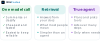
Most products that come to us asking for an agent need one of the first two. Starting there is not settling for less. It is engineering.
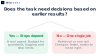
How narrow should the scope be?
Narrower than feels comfortable.
The agents that fail in production are the ones asked to be helpful in general. The ones that work are given a specific job with a clear edge, and they refuse everything outside it.
Our lead generation agent does not chat. It finds prospect information, drafts one personalised proposal, and delivers it. That narrowness is exactly why it can run without someone watching each step.
Write down three things before any code:
- What the agent is allowed to do
- What it must never do, under any instruction
- What it should do when it is not sure
The third one matters most, and it is the one usually left blank.
What guardrails does it need?
The gap between a toy and a product is what happens when the model is wrong. Not if. When.
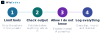
Limit the tools. An agent can only cause harm through actions you gave it. A tool that reads is safe. A tool that sends, charges or deletes needs confirmation and hard limits.
Check every output. If the agent returns structured data, validate it before anything acts on it. Never pipe raw model output straight into a system that does something real.
Let it say it does not know. An agent that hands off to a human when unsure is worth far more than one that always has an answer. Confidence without correctness is the entire risk.
Log everything. You cannot improve what you cannot see. Every input, tool call and decision should be traceable months later.
How do you keep scope and latency under control?
Two things surprise teams after launch: the bill, and how long users wait. Both are decided at design time.
For cost, route by difficulty. Send the easy majority of requests to a small fast model and keep the large model for genuinely hard ones. Cache aggressively, because user questions repeat far more than people expect. Cap how many steps an agent may take, so a confused loop cannot quietly run up a bill overnight.
For speed, stream the response so the user sees progress immediately. Do independent work at the same time rather than in sequence. And be honest about which parts truly need an instant answer, because plenty of useful work can happen in the background while the user does something else.
How do you know it actually works?
"It seemed fine when I tried it" is not a test.
Before launch, collect a set of real examples with known-good answers. Include the strange ones, the rude ones, and the ones designed to trick it. Then measure against that set every single time you change a prompt or a model.
Without this, every improvement is a guess and you will break things silently. A small test set you actually run beats a large one you feel good about owning.
How should you launch it?
Quietly, and to a fraction of people.
Ship to a small slice of traffic, with a human able to see what it is doing and a switch that turns it off in seconds. Watch the logs rather than the feeling in the room.
The failures you find in week one with a tenth of your users are enormously cheaper than the ones you find with everybody. And the ones you find with everybody tend to arrive on a weekend.
Done this way, an AI feature stops being a risk you took and becomes a part of the product you can rely on. The retrieval, prompt and evaluation layers underneath it are covered in LLM integration done right, and what we build is mostly this engineering rather than the model.
Frequently asked questions
Do I need an AI agent or something simpler?
Usually something simpler. A single model call handles summarising, classifying and drafting. Retrieval answers questions from your own documents and is what most people mean when they say agent. A true multi-step agent is only worth it when the task genuinely requires deciding what to do next based on intermediate results.
How do you stop an AI agent doing damage?
Guardrails before cleverness. Limit the tools it can use to the minimum, validate every output before anything acts on it, give it a way to say it does not know and hand off to a person, and log every decision so you can debug it later. Also treat any text it reads as data, never as instructions.
How do you control the cost of an AI feature?
Route by difficulty, so easy requests go to a small cheap model and only hard ones reach a large one. Cache aggressively, because questions repeat more than teams expect. Cap the number of steps an agent may take so a confused loop cannot run up a bill unattended.
How long does it take to add an agent to a product?
It depends far more on scope than on the AI itself. A narrow, well-defined job with clear guardrails is a matter of weeks. An open-ended assistant that is expected to handle anything is not really a project yet, and the first useful step is narrowing it.
How do you test something that gives different answers each time?
Build a set of real examples with known-good answers, including strange and adversarial ones, and measure against it after every prompt or model change. You are not checking for identical wording, you are checking that the answer is still correct and still safe.
What is the safest way to launch?
To a small slice of users, with someone able to watch what it is doing and a switch that disables it immediately. Add each production failure to your test set as you find it. The problems you catch with a tenth of your users cost a fraction of the ones you catch with all of them.
The short version
Pick the simplest tool that solves the job. Give it one job with a clear edge. Build the guardrails first, decide cost and speed on purpose, and test against real examples rather than impressions.
Then launch small, watch closely, and grow it once the logs are boring.