Signs Your Spreadsheet Became a Database
Six signs a shared sheet is now your source of truth, what it stops guaranteeing, and why your columns already describe the system to build.
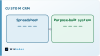
A spreadsheet stops being a spreadsheet long before anyone notices. The file still opens the same way, but somewhere along the line it stopped holding a calculation and started holding the state of your business — who owns which account, what stage each deal is at, which promise was made to whom. That transition is the moment the tool and the job stop matching, and the symptoms are specific enough to name.
The line a spreadsheet quietly crosses
Spreadsheets are extraordinary at what they were designed for: a person, a grid, and a question they want answered today. The design assumes a single author who holds the whole thing in their head, and it optimises hard for freedom — any cell can contain anything, and nothing stops you changing your mind halfway down a column.
A database assumes the opposite. It assumes several people, over a long period, none of whom hold the whole thing in their head, and it trades freedom for guarantees. A field has a type. A record has an identity. A relationship between two records is declared once and enforced everywhere.
The crossing happens when your sheet starts carrying obligations rather than observations. Nobody decides to cross it. It happens the third time someone asks "is this the current version" and gets a shrug.
Six signs it already happened
None of these are about row count. A sheet with two hundred rows can be well past the line and one with fifty thousand can be perfectly healthy, because what matters is what depends on it.
The same real-world thing appears more than once. One customer, three rows, slightly different spellings. This is the clearest signal of all. A database gives that customer an identity and points everything else at it; a spreadsheet has no way to say "these are the same thing", so it drifts by design.
There is a column nobody can define. Every long-lived sheet grows a status or notes column carrying meanings the team learned by osmosis. "P" means something. Half the team knows what. That column is a state machine that was never designed, and it is where errors hide.
Someone reconstructs it by hand to answer a question. If producing a straightforward answer means filtering, copying to a second tab and joining against another file, the shape of the data no longer matches the shape of the questions. That reconstruction is a query, done manually, repeatedly.
Changes cannot be attributed. Something changed. Nobody knows who, when, or what it said before. Version history in a shared sheet tells you a cell changed; it rarely tells you what the business meant by the change.
Access is all or nothing. You need a contractor to update three fields and the only options are edit the whole file or nothing. Sheet protection exists, but it protects ranges, not meaning, and it is the first thing removed when someone is in a hurry.
Another system reads it. A script, an automation, an invoice run, a report someone sends to a client. The moment anything downstream depends on the layout, a colleague inserting a column becomes an outage.

Why the answer is rarely a CRM platform
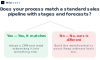
The obvious response is to buy a CRM and move the sheet into it. Sometimes that is right. Often it swaps one mismatch for another, because a CRM is not a neutral container — it encodes a particular sales process, usually a B2B pipeline with stages, opportunities and forecasts.
If your business genuinely works that way, that structure is a gift. If it does not, you will spend your time bending your process into a shape the software recognises, renaming things so the reports make sense, and keeping a spreadsheet on the side for what would not fit. That side spreadsheet is the tell. It means the platform absorbed the standard parts and left the parts that actually distinguish you.
The narrower option is usually better: build the one workflow that is genuinely yours, and let ordinary tools handle the rest. For most teams that is a small system holding the entities that matter, enforcing the rules that must not be broken, and exposing a couple of screens for the people who touch it daily.
Your columns are already the design
The useful thing about a spreadsheet that has become a database is that it is a specification nobody had to write. The columns are your fields. The tabs are usually your entities. The conventions your team learned by osmosis are your business rules, and the fact that they are unwritten is exactly why they get broken.
Reading a sheet this way is quick. Take each column and ask what it really is. Some are attributes of the thing in the row. Some are references to another thing entirely — an owner, an account, a product — and those are the relationships worth making explicit. Some are derived and should never have been stored. And one or two are states, which means there is a set of allowed values and a set of allowed transitions between them.
That reading is most of the design work. It is also why we start with a working prototype rather than a requirements document: a prototype loaded with a copy of your real sheet shows you within minutes which rules your data already violates, and those violations are the argument for building anything at all. We wrote about that approach in why we build a free prototype first, and it applies here more than anywhere.
The migration itself is usually the least interesting part. What matters is deciding what the system will refuse to accept. A spreadsheet accepts everything, which is why it drifts. The value of building something is not the interface — it is the set of things that become impossible.
If you are somewhere on the right of that map, the next step is not choosing software. It is reading your own columns and writing down the rules you have been enforcing by memory. Once those are on a page, whether you buy or build becomes a much smaller question — and one you can answer with our AI automation or web work depending on where the complexity actually sits.
Frequently asked questions
How many rows before a spreadsheet is too big?
Row count is the wrong measure. What matters is whether other work depends on the sheet — the moment a report, an automation or a colleague's job relies on its layout, it is carrying more than a spreadsheet can guarantee.
Is a shared cloud sheet enough to fix this?
It fixes the copies problem and none of the others. Real-time collaboration removes version conflicts, but it does not give records identity, fields types, or changes attribution.
Should we buy a CRM or build something?
Buy if your process genuinely matches a standard pipeline. Build if the part that distinguishes you is the part that would not fit — and watch for the side spreadsheet, which is the sign it did not fit.
What is the first thing to design?
The entities and their identities. Decide what a customer is, what makes two rows the same customer, and everything else follows from that.
Can we keep using spreadsheets afterwards?
Yes, and most teams should. Spreadsheets are excellent for analysis and one-off questions. The change is that they read from the system rather than being the system.
What usually goes wrong in this move?
Rebuilding the spreadsheet exactly, grid and all. Copying the interface preserves the freedom that caused the drift, and the new system inherits the same integrity problems.