What to Automate First: The Constraint Slowing You Down
Most small businesses automate the wrong workflows. Learn how to identify which manual task is actually blocking growth and costing you capacity.

Most businesses automate the tasks that feel repetitive. They skip the ones that actually slow them down.
The workflow worth automating first is whichever one creates a bottleneck. Manual work that blocks revenue, delays decisions, or forces you to hire before you're ready. Custom automation lets you fix that constraint directly instead of bending your process around what a SaaS tool happens to offer.
What actually decides which workflow to automate
Three factors drive the choice: how much time the workflow burns, how often it breaks, and whether the data it touches matters to other parts of the business.
Start with time. A task that consumes multiple hours daily from multiple people costs substantial capacity. Automating it buys back that capacity immediately. A task that runs infrequently and takes minimal time? Not worth custom tooling.
Then look at failure rate. Manual processes break when someone is out, when instructions change, or when volume spikes. If a workflow has failed repeatedly, it will fail again. Automation removes that risk.
Finally, check whether the workflow feeds other systems. Customer data that flows into your CRM, invoices that update your accounting ledger, leads that trigger follow-up sequences - all benefit from automation because one clean input improves everything downstream.

We wrote about seven workflows worth auditing first if you want a concrete starting list. The pattern holds: automate what burns time, breaks often, and matters to the rest of the business.
The questions to settle before you build anything
You need to know three things before you write a line of code or sign a vendor contract.
First: is this workflow actually blocking other work? If five people are waiting on one manual approval step, that constraint is costing you more than the time spent doing it. If it runs once a quarter and nobody notices, it can wait.
Second: what breaks when someone makes a mistake here? A typo in a spreadsheet that corrupts your reporting is a different problem than a misspelled subject line. Error rate and blast radius tell you how urgent the fix is.
Third: where does the data live right now, and who touches it? If three people are copying the same information between four systems, that handoff is the bottleneck - not the task itself.
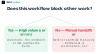
These questions filter out workflows that feel tedious but don't actually cost you anything. A repetitive task that runs smoothly is not the same problem as a manual process that breaks your pipeline when one person is on leave.
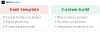
What's the difference between a workflow bottleneck and a task you simply dislike doing? Whether fixing it unblocks someone else. Start there. When custom fits better than a template covers the next decision after you've identified the constraint.
How to approach automation in practice
Start with the workflow that blocks the most people the most often. Three team members wait on one person to approve invoices? That approval step is your first target. Customer onboarding takes five emails back and forth? Automate the repetitive parts and leave the judgment calls to humans.
Plot your candidate workflows by impact and feasibility before you build anything:
Top-right quadrant is where you start: high impact, straightforward to build. Lead routing, support ticket triage, and invoice processing usually land here. Top-left quadrant - high impact but complex - is where AI automation built for your workflow pays off, because the constraint relief justifies the custom work.
Bottom-left tasks stay manual. A workflow that happens twice a month and takes ten minutes? The automation costs more than the problem.
Build one workflow end-to-end before adding the next. A working invoice approval bot teaches you more than three half-built automations.
What to check before you commit to custom
Read the existing code before you write new automation around it. If the workflow lives in a spreadsheet that imports from three other sheets, the automation inherits that fragility. Sales notes sit in Slack threads instead of a structured log? Your AI agent has nothing reliable to query.
Check these before you build:
- Can the current system export clean data, or will you spend half the budget cleaning it first?
- Do the people running the workflow agree on what "done" looks like?
- Is there a single source of truth, or does information live in five places?

If the workflow depends on someone remembering to CC the right group or update a status column, automation will surface that as a hard failure instead of a quiet miss. Fix the workflow design first, then automate it. Or request a free prototype and we'll map the current state with you before writing a line of code.
How to tell the automation is working
Look at what changed in the day-to-day work, not at a dashboard. Team stopped asking "Where did that lead go?" or "Did we send that follow-up?" The automation is doing its job. They're still working around it? Not yet.
The signal is behavioral. People route work through the new system instead of reverting to email threads and shared spreadsheets. They stop maintaining the parallel manual process they kept as backup. That means the automated workflow became more reliable than what it replaced.
Watch error rates and bottleneck shifts. Automation that catches most cases but escalates edge cases cleanly to a human? Success. It silently drops data or requires constant manual fixes? The design missed something structural about how the business process actually runs.
The real test is whether the constraint moved. Automation that works makes a different part of the operation the limiting factor.
Frequently asked questions
How do I know if a workflow is bottlenecking my business?
You know it's a bottleneck when the same person has to touch every instance of the task and delays pile up if they're unavailable or busy with something else.
What happens to my data if I automate a workflow?
The automation reads and writes to your existing systems - your CRM, your sheets, your database - so your data stays exactly where it is now.
Can I automate part of a workflow and leave the rest manual?
Yes, and that's often the right approach. Automate the predictable steps and leave the judgment calls or edge cases to a person.
What if the workflow changes after I automate it?
Custom automation is code you own, so you can adjust it when the process changes. Off-the-shelf tools lock you into their workflow, which is harder to change.
How do I test automation before it touches real work?
Run it against a copy of your data first, check the output manually, and start with a small batch before rolling it out to the full workflow.