Choosing a Database for a SaaS Product
Most founders pick a database on familiarity. How to choose on query patterns, scale and operational burden - before migration becomes impossible.
Most SaaS founders pick a database based on what they already know. Much later they discover that moving off it means rewriting more of the product than they ever expected to touch.
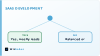
Two things decide it: your query patterns and how much relational structure you need. If you join across three tables on every page load, Postgres makes sense. If you store JSON blobs and filter by a few top-level keys, Mongo or DynamoDB will scale cheaper and faster. Read/write ratio, ACID requirements, sharding - those follow from the first two.
Why database choice is harder than it looks for SaaS founders
Most founders think database choice is a technical detail.
Wrong.
Your database locks in hosting costs, query patterns, and how much work it takes to add new features. Change it later and you face a migration that costs what the original build did.
Three ways this goes wrong:
- Picking based on what you know. You choose PostgreSQL because your last developer used it, not because your product needs relational data.
- Optimizing for today's scale. You pick a database that works great at 500 users and breaks at 5,000.
- Ignoring the total cost. Managed database services look cheap until you hit the pricing tiers where read replicas and backups cost more than your hosting.
The business risk isn't picking wrong. It's picking without knowing what you optimized for. Database decisions are build-vs-buy cost framework questions in disguise - every option trades one cost for another.
If your SaaS handles customer data across multiple tenants, schema design drives whether you can offer per-customer data isolation. Get that wrong and compliance becomes impossible.
Pick the database that fits your read-write ratio, your query complexity, and your three-year hosting budget. Not the one that feels modern.
The three variables that decide your database architecture
Three variables decide which database fits a SaaS product. Get one wrong and you pay for it later in refactoring time or vendor bills.
Your read-to-write ratio comes first. A content platform might see 1,000 reads for every write. A team collaboration tool might see equal reads and writes, or more writes. Read-heavy products benefit from caching layers and read replicas. Write-heavy ones need strong consistency and fast write throughput.
Your data structure comes second. Relational databases like PostgreSQL enforce structure through schemas and foreign keys. Document stores like MongoDB let each record have different fields. If your product has strict relationships between entities - users, organizations, subscriptions, permissions - relational wins. If each record is mostly independent and your schema changes every sprint, document stores reduce friction.
Scaling needs come third. A product serving 500 users has different needs than one serving 500,000. Horizontal scaling - adding more servers instead of bigger ones - matters when growth is steep. Some databases scale horizontally by design. Others require manual sharding or expensive managed services.
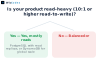
We build full-stack web development projects with these databases weekly. Match your access pattern first, then structure, then scale needs. Most early SaaS products fit PostgreSQL. The exceptions are clear once you answer the three questions.
A practical decision framework for SaaS founders
Start with your product's actual workload. A CRM with thousands of daily reads needs different architecture than a time-tracking tool that writes every minute. We built SolarSathi on Postgres because vendor listings were deeply relational. We used MongoDB for a social feed where structure changed constantly.
Three questions before you choose:
- Does your schema change often or stay stable? Frequent schema changes favor NoSQL. Fixed relationships favor relational.
- What breaks first when you scale - reads, writes, or queries? Read-heavy apps cache well. Write-heavy apps need different write throughput.
- Can you move later without rewriting the application? Some databases wire into your codebase. Others swap out cleanly.
Wrong choices compound quietly. The symptoms arrive long before anyone connects them to the data model, and by the time the connection is obvious the fix has grown into a migration project.
The forces behind that are covered in what actually shapes a custom software build. Choose for the load you can already see coming, not for your current state, and pick something your team can actually operate.
The migration scenarios that catch founders out
Three patterns destroy budgets. A founder picks a database that works fine at launch. Then revenue scales, usage patterns shift, or a compliance requirement appears - and the database can't handle it.
Traffic growth breaks the architecture first. You launch on a single PostgreSQL instance because it's simple. Then concurrency climbs and queries start timing out. The fix isn't vertical scaling - it's rewriting the data layer to support read replicas, connection pooling, and caching. That is engineering work, not a config change.
Schema changes force full rebuilds. You chose a document database for speed, but now every query needs to join data across three collections. MongoDB can't do relational joins efficiently, so you either accept slow queries or migrate to PostgreSQL. Migration means rewriting the ORM layer, testing every endpoint, and running dual writes during the transition. The work is proportional to how much of the codebase grew around the wrong data model, which is why it is so much larger late than early.
Vendor lock-in blocks you from switching. DynamoDB works great until you need complex queries or want to move off the platform. The API is proprietary, so migration means rewriting every database call in your application. One team had to move from DynamoDB to PostgreSQL because an enterprise customer required on-premise deployment, and every database call had to be rewritten to do it.
Validate your database choice before you build. Map your queries, estimate your scale, and pressure-test the architecture with someone who has migrated databases in production. If you're not sure where to start, get a free prototype that models your data layer before you commit to a direction.
How to validate your database choice before you build
Run a load test against a realistic schema before you commit. Spin up both candidates on free-tier cloud instances, seed them with sample data at the scale you expect in year one, and time your most common queries. If your app will have 50,000 users reading dashboards simultaneously, simulate that read pattern. Capturing IoT telemetry every five seconds? Simulate the write throughput.

Test migration next. Export a subset of your data, transform it to the new schema, and import it. Time the process and note what breaks. Time it on a sample and extrapolate to your full dataset. That ratio tells you whether a future migration is something a team can absorb or something that would stop the roadmap.
Check the ecosystem last. Does the database have a mature ORM for your language? Can your hosting provider run it without custom infrastructure? Are there monitoring tools that work out of the box? A fast database that requires you to build half the tooling yourself will cost more than a slower one with a complete ecosystem.
Frequently asked questions
How much does it cost to migrate a database once you have paying customers?
It scales with how deeply the old model is embedded, not with how much data you hold. The work is migration scripts, a zero-downtime switchover, testing under load, and fixing whatever breaks — and all of it grows the longer the wrong model stays in place.
Can I change databases later without downtime?
Yes, but it requires dual-write patterns, read replicas, and careful orchestration. Most teams underestimate the engineering effort and end up with a maintenance window anyway.
Should I pick the database I know or the one my product needs?
Pick the one your product needs. Learning a new database takes days; migrating later takes months and costs six figures. Start with the right architecture.
What happens if I get the database choice wrong?
You hit a scaling wall, performance degrades, and you either pay for a painful migration or architect around the limitations. Both options are expensive and slow down your roadmap.
Do I need to decide this before I build the MVP?
Yes. Your database choice shapes your entire data model, API design, and scaling path. Changing it later means rewriting large parts of your application, not just swapping a connection string.
How do I know if my database can handle the scale I'm planning?
Load-test it before you ship. Synthetic traffic that mimics real user patterns will surface bottlenecks early, when they are cheap to fix.