How to Add End-to-End Encryption: The Recovery Trap
End-to-end encryption protects messages but breaks account recovery. Learn the tradeoff between client-side keys and server-assisted recovery.

End-to-end encryption means only the sender and recipient can read a message. The server that routes it cannot. It works by encrypting the message on the sender's device with a key only the recipient holds. Someone intercepts the data in transit or breaches the server? They see gibberish. The catch most teams miss: strong encryption and easy account recovery pull in opposite directions.
What end-to-end encryption actually means
The message is encrypted on the sender's device and only decrypted on the recipient's device. The server sees ciphertext. It cannot read the content.
Without E2E, the server reads every message. With E2E, the server is just a relay.
Encryption keys live on user devices, not on your backend. Your database stores encrypted blobs. You cannot decrypt them. An attacker who compromises your server cannot decrypt them either.
This creates a trust boundary. Users trust their own device and the recipient's device. They do not trust the network or the server. E2E protects that boundary.
For cross-platform messaging apps, E2E means:
- Keys are generated on the device when the user registers
- Messages are encrypted before leaving the sender's phone
- The server routes encrypted payloads between devices
- Only the recipient's private key can decrypt the message
The server never holds plaintext or decryption keys. If you can read your users' messages in a database query, it is not end-to-end encrypted.
E2E is a deployment decision, not a feature you add later. It changes how you handle message storage, search, moderation, and account recovery.
How E2E encryption works in a chat app
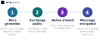
The mechanism runs in five phases, each with a clear security boundary.
Key generation happens on the device when the user registers or logs in. The app creates a public-private key pair using an algorithm like RSA or Curve25519. The private key never leaves the device. The public key gets uploaded to a key server so other users can find it.
Next, the sender retrieves the recipient's public key from that server. This is the discovery phase. The server acts as a directory, not a vault.
The sender's device encrypts the message using the recipient's public key before transmission. The message leaves the device already encrypted.
The encrypted payload travels through the server. The server can route it, store it, and index the metadata. It cannot read the content. This is the trust boundary.
Finally, the recipient's device decrypts the message using its private key. Only that device holds the key needed to unlock it.
We built this exact flow into Tiny Talk Hub using libsodium's sealed boxes. The server never touched a decryption key. That constraint shaped the entire backend architecture.
Client-side keys vs server-assisted recovery
When you generate encryption keys on the client device, only that device can decrypt messages. The server never sees the private key.
But you get a recovery problem. User loses their device or reinstalls the app? Their private key is gone. Without it, every past message stays encrypted and unreadable forever.
You have two paths forward:
- Pure client-side keys. The user backs up their key, usually through a recovery phrase they write down. Signal does this. Most secure option because the server never holds anything useful to an attacker. But users lose access if they lose the phrase.
- Server-assisted recovery. The server stores an encrypted copy of the private key, unlockable with the user's password. WhatsApp does this. Users can recover their account from any device. The server becomes a higher-value target. You trade some threat-model purity for user convenience.
Neither is wrong. Your users decide. Who are they and what will they actually do? A B2B compliance tool probably enforces client-side keys and recovery phrases. A consumer chat app competing with SMS probably needs server-assisted recovery or users will churn when they get a new phone.
This decision also shapes structuring user permissions. Keys live client-side only? You cannot offer admin-level message access or enterprise audit logs without breaking the encryption model.
What it looks like in a real messaging build
We built Tiny Talk Hub and WizChat with different encryption models because the trust boundaries were different. Tiny Talk Hub routes messages through a relay server but never stores private keys there. WizChat needed offline message delivery, so we added server-side encrypted backup with user-controlled recovery phrases.
Differences show up early in the build:
- Key generation. Tiny Talk happens on the device when you first open the app. The server never sees your private key. WizChat generates keys the same way, then encrypts and stores a copy server-side, unlocked only by your recovery phrase.
- Message send. In both apps, the sender encrypts the message with the recipient's public key before it leaves the device. The server handles routing but cannot decrypt the payload.
- Device loss. Tiny Talk users lose their message history if they lose the device. No server backup. WizChat users can restore from the server using their recovery phrase.

The choice comes down to the user's mental model. They think of the app as ephemeral? Messages that exist only while the conversation is active? Client-side keys fit. They expect message history to follow them across devices? You need server-assisted recovery or a more complex peer-to-peer sync layer.
Start with the simpler model. Add recovery only when users ask for it. Not sure which boundary fits your product? Build a free prototype and test both flows with real users before committing to the full cryptographic handshake.
How to tell whether your chat app needs E2E
Three things decide whether you need end-to-end encryption: what your users expect, what you are legally required to protect, and whether you can live with the recovery trade-offs.
Your app handles health records, financial conversations, or legal communication? Regulation usually requires it. HIPAA, GDPR, and similar frameworks expect technical controls that match the data's sensitivity. Server-side encryption is not enough when the server operator is in scope.
User expectation is the second signal. A team collaboration tool where the company owns the workspace can often skip E2E without breaking trust. A consumer messaging app competing with Signal or WhatsApp cannot. Users arrive with a mental model. Your privacy posture does not match it? They leave or never sign up.
Recovery is the third factor. E2E means the server cannot read messages, so it also cannot restore them if a user loses their device. You either accept that users lose history when they lose keys, or you build a recovery mechanism that weakens the encryption guarantee. Both are valid choices. The decision shapes the product.

The baseline test: a government or legal order compels you to hand over message content. Would your users expect you to be unable to do so? If yes, you need E2E. The answer is "we would comply and users understand that"? Server-side encryption may be enough.
Frequently asked questions
What happens to my messages if I lose my device?
With client-side keys, your messages are unrecoverable unless you backed up the key. With server-assisted recovery, you can regain access through your recovery method, but the server sees encrypted key material during that process.
Can the server read my messages in either approach?
No. In both cases, messages are encrypted end-to-end and the server only stores ciphertext. The difference is whether the server ever handles key recovery material.
How do I know which approach fits my app?
If your users expect to switch devices often or forget passwords, server-assisted recovery prevents support tickets. If your users prioritize zero server trust - healthcare, legal, whistleblowing - client-side keys are the safer choice.
Can I add E2E encryption to an existing chat app?
Yes, but you will need to migrate message storage, rework your database schema to store ciphertext, and handle a transition period where some users have encryption and others do not.
What breaks when I add end-to-end encryption?
Server-side search stops working because the server cannot read message content. Moderation tools that scan for abuse also stop working unless you build client-side reporting flows.
Do I need E2E encryption if my app already uses HTTPS?
HTTPS encrypts data in transit, but your server still sees plaintext messages and can read, log, or leak them. E2E encryption ensures only the sender and recipient ever see the content.