What Small Teams Need From Task Software
Small teams need coordination, not resource management. What actually earns its place on a board, and the drift that makes a tool impossible to leave.
Small teams tend to choose task software by comparing feature lists, then use about a tenth of what they picked. That is not a failure of discipline. It is what happens when the tools are built for a different problem than the one a small team actually has — and the mismatch is specific enough to describe, which makes it avoidable.
Two different problems wearing the same name
Task software split into two categories a long time ago, and both call themselves the same thing.
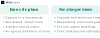
The first solves coordination. A handful of people need to know what is being worked on, what is blocked, and what is next. Everyone can hold the whole picture in their head; the tool exists so they do not have to hold it simultaneously. What matters here is that the current state is visible at a glance and updating it is nearly free.
The second solves resource management. Many people across many projects, where nobody can see the whole picture and decisions have to be made about allocation, dependencies and capacity. Gantt views, workload balancing, portfolio roll-ups, custom fields, approval chains — these exist because at a certain size you genuinely cannot coordinate by talking.
The features from the second category are not useless. They are answers to questions a small team does not have yet. And they are not free: every one adds a field to fill in, a view to maintain, and a way for two people to record the same thing differently.
What small teams actually use
Watch a small team over a few weeks and the same short list emerges, regardless of which tool they chose.
Capture that takes seconds. If recording a task is slower than remembering it, people remember it, and the tool stops reflecting reality. This is the single biggest determinant of whether a tool survives contact with a real team.
One current view. Not seven views for seven roles. One board or list that everybody looks at, where the state on screen is the state in the world. The moment there are two views that can disagree, someone starts maintaining the tool rather than doing the work.
An owner per item. Not a team, not a label — one person. Shared ownership is the most reliable way for a task to sit untouched for a month while everybody assumes somebody else has it.
A visible definition of done. Whether it is a column, a checkbox or a convention, everyone needs to agree what makes something finished. Most stalled boards are stalled because "in progress" quietly means five different things.
That is close to the whole list. Notice what is absent: estimates, dependencies, custom workflows, time tracking, automations. Those become valuable at a size where nobody can see everything — and adopting them early costs the thing that actually matters, which is that updating the board stays effortless.
The failure mode worth avoiding
The genuine risk is not choosing the wrong tool. Task tools are among the easiest software to leave — the work moves, the history rarely matters much, and everybody has switched before.
The risk is that the tool stops being a task list and becomes the place your business keeps state. It happens gradually and always for good reasons. Someone adds a custom field for "client approved" because it was faster than changing anything else. Someone else adds "invoice sent". Before long, your delivery process and your billing process both depend on fields inside a task tracker, and it can no longer be replaced without unpicking both.
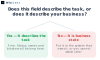
The signal to watch for is a custom field that answers a question about the business rather than about the task. "Blocked" is about the task. "Contract signed" is not — it belongs in whatever system owns contracts.
The same drift affects spreadsheets, and for the same reason: a tool that lets you record anything will eventually be asked to record everything. We wrote about the spreadsheet version in signs your spreadsheet became a database, and the boundary question is identical.
Adoption is about habits, not features
The tool that works is the one people actually update, and that has less to do with capability than with where the team already talks.
If your team lives in a chat tool, task software that creates and updates items from chat will be used. Task software that requires opening a separate tab will be used for a fortnight. This is not laziness — it is that every context switch is a small tax, and small taxes compound until the board stops matching reality. A board that does not match reality is worse than no board, because people make decisions from it.
So the evaluation is behavioural rather than functional. Run your real work through a trial for a couple of weeks. Do not evaluate the features; watch whether people update it without being reminded. If they need reminding, the tool is losing to the friction of using it, and no feature on the comparison page fixes that.
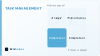
Most small teams sit in the bottom-left and should stay there deliberately, choosing the simplest thing their team will actually keep current. The bottom-right is where custom work occasionally earns its place — not a replacement task tool, but one workflow that is genuinely yours, sitting alongside an ordinary tool that handles everything standard. That narrow shape is almost always the right one, and it is the pattern behind most of our AI automation work.
Frequently asked questions
Why do small teams use so little of their task software?
Because most advanced features answer questions that only arise when nobody can see the whole picture. On a small team everyone can, so those features add maintenance without adding clarity.
What matters most when choosing?
How quickly a task can be captured, and whether the team updates it without being reminded. A board that does not match reality is worse than no board.
Should tasks have a team owner or a person?
A person. Shared ownership is the most reliable way for something to sit untouched while everyone assumes someone else has it.
What is the biggest long-term risk?
The tool quietly becoming your system of record. Once business state lives in custom fields on tasks, the tool cannot be replaced without unpicking the processes that depend on it.
How do we know if a field belongs there?
Ask whether it describes the task or the business. Blocked describes the task. Contract signed describes the business and belongs in the system that owns contracts.
When does custom task tooling make sense?
Rarely as a replacement, sometimes as one workflow. If a specific part of how you work is genuinely unusual, build that piece and let an ordinary tool handle everything standard.