What Most Teams Get Wrong Migrating Spreadsheets
Most spreadsheet migrations fail because teams copy cells instead of extracting business logic. Here's how to decode formulas and rebuild them.

Most migrations fail because teams treat the spreadsheet as a UI to replicate instead of a repository of business logic to decode. You extract the rules, calculations, and workflows that live in formulas and macros. You rebuild them as versioned, testable code. Copying cells into a database and hoping the logic follows does not work.
What actually decides whether the migration works
Structure decides it. How many workbooks feed into each other, how deeply the formulas nest, and whether the logic is encoded in cell references or written out somewhere all determine difficulty.
A single workbook with clear column names and a few SUMIFs migrates cleanly. A web of linked files does not. Each has its own macro and hidden reference cells. If you cannot map the business rules without opening five tabs and tracing precedents, the migration will break in production.
Version control is the other constraint. Spreadsheets have none. Three people edit the same file and one overwrites the other's changes. Last save wins. A web app needs a single source of truth for its logic. You decide which version of the formula is correct before you write any code.
We rebuilt a spreadsheet that became a database by spending substantial time with the client extracting every calculation and asking which edge cases still mattered. Extraction took longer than the build. The logic lived in the user's head, not the file.
If the person who built the spreadsheet cannot explain a formula in one sentence, treat that formula as unmigrated risk.
Data types, validation rules, automation workflows can be solved with standard patterns once the core logic is clear.
The questions to settle before you start
You need to know what the spreadsheet actually does and who depends on it. That means identifying every formula, every macro, every person who updates it, and every downstream report or process that reads from it.
Start with an audit:
- Which cells contain logic versus static reference data?
- Where do formulas pull from other sheets or external files?
- Who makes changes, and how often do they change the rules versus the data?
- What breaks if this spreadsheet goes offline for an hour?
Once you understand the dependencies, map each formula to a business rule you can name. "Calculate commission after threshold" is clearer than "IF D2 > 5000, D2 * 0.15, D2 * 0.10" when you write tests later.

The validation layer is not optional. Spreadsheets let users enter anything. Your application should reject bad input before it reaches the custom dashboard vs off-the-shelf BI that ten people check every morning.
Run both systems in parallel for at least one full cycle before you retire the spreadsheet.
How to extract logic without breaking production
Migrations break when you lose the logic buried inside the spreadsheet. Formulas, validation rules, macros, and pivot tables all encode decisions about how the business runs. Moving data is easy. Moving the logic without breaking it requires systematic extraction.
Catalog what the spreadsheet actually does. Walk through every formula, every conditional format, every macro. Document the business rule each one enforces. A formula that flags overdue invoices is really a credit policy. A macro that sends reminders is a workflow trigger. Write down what each piece means in plain language before you touch any code.
Map each rule to its new home in the application. Formulas become functions in your business logic layer. Validation rules become database constraints or input guards. Macros turn into scheduled jobs or event handlers. Pivot tables become parameterized queries. Manual data entry becomes forms backed by API endpoints.
Run both systems in parallel during the transition. Spreadsheet stays live while the new app processes the same inputs. Compare outputs daily. When they diverge, you have found a rule you missed or translated incorrectly. Fix it before you cut over.
Digital transformation without an enterprise stack proves itself here. You are not replicating every spreadsheet feature. You extract the logic that matters and build production software around it. The new system will be stricter, more reliable, and easier to change when the business needs it to.
What to check before you go live
A working migration in staging is not the same as one in production. Real users arrive with real expectations about how the system behaves.
Check that the new app matches the spreadsheet's output for every scenario you can enumerate. Run the old formula side by side with the new logic and confirm they produce identical results. If they diverge, you need to know why before anyone else does.

Test error handling explicitly. The spreadsheet might have failed silently or shown a cell error that someone manually fixed. Your web development app needs to surface those failures in a way that makes the problem clear and the fix obvious.
Confirm that access controls work as intended. If the spreadsheet lived in a shared drive with implicit permissions, the new system needs explicit roles. Who sees what, and who can change it.
Run a final audit of any external dependencies. If the migration pulls data from another tool or pushes updates to a third-party system, verify those integrations under load before you route production traffic through them.
How to tell the migration succeeded
You know the migration worked when the old spreadsheet stops being the source of truth. If people still open Excel to check numbers or make decisions, the web app is decoration.
Behavior is the actual test. Do users trust the new system enough to delete rows in the spreadsheet? If the answer is no, you moved the data but not the workflow.
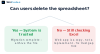
A successful migration produces three observable changes:
- Spreadsheet file gets archived - renamed with a date, moved to a backup folder, or deleted entirely because it is no longer needed for production decisions.
- Support requests reference the web app - when someone asks about a number, they send a link to the dashboard, not a screenshot of cells.
- New logic goes into code, not formulas - the next time business rules change, the team files a feature request instead of editing the sheet.
If well after launch the spreadsheet still lives in a shared drive and people keep it "just in case," the migration failed. The app became a reporting layer on top of Excel, not a replacement for it.
Operational confidence is the goal. Users should feel safer with the web app than they ever did with version-controlled workbooks.
Frequently asked questions
What happens to the data still in the spreadsheet during the migration?
The spreadsheet stays live and unchanged while the new system is built alongside it. We extract logic and structure first, then mirror data into the new system, validate the outputs match, and only then switch traffic over.
How do you know the formulas in the new system work the same way as the old ones?
We run both systems in parallel on real data and compare outputs line by line. Any mismatch gets traced back to the source logic, fixed, and tested again until results align.
What if someone is still updating the spreadsheet while you're building the replacement?
That's expected. We build the new system to handle current logic, then sync any changes made during the build before cutover so nothing gets lost.
Can you migrate part of the spreadsheet and leave the rest alone?
Yes. We extract whichever workflows are causing the most friction first and leave stable parts untouched until they need to change or break.
What if the spreadsheet has macros that no one understands anymore?
We reverse-engineer what the macro actually does by running test cases and reading the output, then rebuild that behavior as versioned code with tests so the next person can follow it.
How do you decide whether to migrate or just keep using the spreadsheet?
If the spreadsheet breaks production workflows, blocks new features, or requires manual fixes every week, migration pays off. If it still works and stays small, leave it alone.