MOBILEMental WellnessCA
Destiny AI Journal
A voice journal that transcribes, summarises and narrates every entry — without making anyone wait for it.
- Our role
- Product design · Mobile · Backend · AI pipeline · Deployment
- Platforms
- iOS · Android
- React Native
- Expo
- FastAPI
- Supabase
- Groq
- RevenueCat
- Voice AInarration per entryGenerated and played back in-app
- Moodtracking & heatmapsHistorical view of how entries trend
- RevenueCatbilling integratedMonthly and yearly subscriptions
- Asyncby designEntries save first, AI catches up behind
At a glance
- Business problem
- People abandon journaling apps when the app interrupts them. Destiny AI Journal had to add transcription, summarisation and spoken narration to a journal entry without making the writer wait for any of it.
- Technical challenges
- Destiny AI Journal chains three separate AI services per entry — speech-to-text, summarisation, then text-to-speech. Run in sequence and in the foreground, that chain is long enough for a user to notice, and it has to work on a phone with an unreliable connection.
- Engineering solution
- Destiny AI Journal saves the entry to Supabase immediately and returns, then processes transcription, summary and narration on background workers, streaming each result back to the app as it completes.
- Core features
- Voice journaling with automatic transcription. AI-written summary per entry. Spoken narration played back in-app. Mood tracking with a historical heatmap. Social feed and user matching. Subscription billing via RevenueCat. Push notifications.
- Architecture
- React Native (Expo)FastAPIGroqReplicateEdge TTSSupabaseBackground workers
- Technical highlights
- Entries persist before any AI work begins, so nothing blocks the write. Results stream back progressively rather than arriving in one response. One Expo codebase targets both iOS and Android. Supabase realtime carries the social feed without a separate WebSocket layer.
- Business value
- Destiny AI Journal gives a writer a transcribed, summarised and narrated entry while keeping the app as fast to write in as a plain notes app. The AI is additive rather than something the user waits on.
The problem
Journaling apps lose people at the moment of writing. Anything that interrupts the write — a spinner, a wait, a screen that will not accept input yet — costs you the entry, and often the habit.
Destiny AI Journal set out to do three AI jobs on every entry. Transcribe the voice recording. Summarise what was written. Narrate it back in a real voice. Each one is useful. Each one takes time. Done in the obvious order, the writer sits and waits for all three.
The brief was to add all of it and have the app still feel like a notes app.
The constraints
Three things shaped every decision that followed.
Three AI services, chained. Speech-to-text feeds summarisation, which feeds text-to-speech. Each step needs the one before it, so they cannot simply run at the same time.
Phones lose connection. A journal entry written on a train has to survive the tunnel. Anything that only exists on a server until the round trip completes is an entry you can lose.
Two platforms, one budget. iOS and Android, both properly native-feeling, without building the app twice.
The interesting question was never which model to use. It was what the user is allowed to be waiting for.
How we built it
We inverted the order. The entry saves to the database first and the app returns immediately. Only then does the AI work start, on background workers, with each result streamed back to the app as it lands.
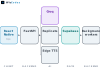
The practical effect: the write is a database insert and nothing else. Transcription appears a moment later. The summary follows it. Narration arrives last, because it is the slowest and the least urgent — nobody needs to hear their entry read back the instant they finish writing it.
Expo covers both platforms from one codebase, and its over-the-air update mechanism means a JavaScript-level fix reaches a build without a full native rebuild — which is worth a lot on a product still finding its shape.
Inside the product
- The week, not the monthSeven days is the horizon someone actually thinks in. A full calendar turns a missed day into a visible gap, which is the opposite of what a journaling habit needs.
- One tap, no typingThe smallest possible unit of engagement, and the thing that brings someone back on a day they do not feel like writing.
- Commit, then optionally writeThe check-in stands on its own. Making it a gateway to the editor would have made the cheap action feel like the start of an expensive one.
- The entry, one tap awayStreak and entry share a card, so the reason to continue and the means to continue are never in different places.
The home screen does the work of three: it shows the week, captures a mood in one tap, and opens the day's entry.
The mood check-in is the part we spent the most time on. It is the smallest possible unit of engagement — one tap, no typing — and it is what brings someone back on a day they do not feel like writing. Mood history then feeds the heatmap, so a month of one-tap check-ins becomes something worth looking at even if none of them became an entry.
The social feed runs on Supabase realtime rather than a separate WebSocket service. One less system to run, and one less thing to fail.
What we built
- Voice recording with automatic transcription
- An AI-written summary attached to each entry
- Spoken narration, generated per entry and played in-app
- Mood tracking, with a historical heatmap
- A social feed with user matching
- Subscription billing through RevenueCat, monthly and yearly
- Push notifications
- One Expo codebase targeting both iOS and Android
The decisions that mattered
Groq over the obvious default, for latency. The pipeline's total time is the sum of three steps, so a saving on any one of them is a saving the user feels. Raw transcription-to-summary speed was the deciding factor, not benchmark quality.
Supabase realtime instead of a WebSocket layer. The social feed needed live updates. Supabase already provided them. Adding a second realtime system would have meant another service to deploy, monitor and pay for, to do a job the database already did.
Background workers instead of a longer request. The alternative — hold the request open until all three AI steps finish — is less code. It also makes every entry as slow as the slowest model, and every dropped connection a lost entry. Splitting the write from the processing is the single decision the whole app rests on.
If you are weighing a similar build, React Native versus Flutter covers the framework half of this decision, and adding an AI agent to your product covers the pipeline half.
Questions buyers ask
How long does an app like Destiny AI Journal take to build?
A voice-plus-AI app of this shape is a multi-month build, not a multi-week one. The mobile app, the backend, three AI integrations and subscription billing are each meaningful pieces of work. We scope it in stages and show you a working prototype before you commit to any of it.
Who owns the code and the developer accounts?
You do, entirely. We build and deploy into your own hosting and your own Apple and Google developer accounts, so there is nothing to migrate later and no dependency on us.
Does running three AI services per entry make the app expensive to operate?
Per-entry AI cost is real and worth modelling before you build, not after. It is one of the first things we work through with you, because it decides which models are viable and whether a subscription price covers them.
Can this be built for one platform first?
It can, but with React Native and Expo there is usually little reason to. One codebase covers both platforms, so building iOS-only rarely saves the half of the budget people expect it to.